Texas property teams have a lot on their plates right now. If you searched for HOTMA compliance checklist Texas, you probably want a clear path, not more noise.
That makes sense because rules can shift, software can lag, and one missed step can slow down recerts and reviews. This guide gives you a practical HOTMA compliance checklist Texas teams can actually use in the field.
If you manage affordable housing in Texas, this topic hits daily work. It affects applications, income reviews, asset questions, forms, training, and your file flow from start to finish.
At Sanchez Compliance & Consulting, our approach is straightforward: keep files clean, eliminate rework, and ensure your site stays audit-ready all year long.
If your team feels behind, you are not alone. Many Texas sites are still lining up policy changes, form updates, and software settings at the same time.
There is also timing to watch. A Federal Register notice on the HOTMA extension moved the compliance deadline for certain CPD and homeless programs to January 1, 2027.
Texas followed that extension for several housing programs. The state also posts current forms, implementation notice updates, and program materials on the TDHCA compliance forms page.
This article focuses on what Texas managers can do now. You will get the rule changes that matter most, a working checklist, and the pitfalls that trip teams up.
Table Of Contents:
- What Changed and Why It Matters in Texas
- HOTMA Compliance Checklist Texas Property Managers Can Use Now
- Review Policies Before You Touch the Files
- Audit Your Forms and Resident Documents
- Check Your Software Before It Creates Bad Math
- Train Staff So They Can Explain the Changes
- Run an Internal Audit Before the Real One Finds the Gaps
- Common Texas HOTMA Problems That Cause Rework
- A Simple 30 Day Action Plan for Property Teams
- Why Texas Teams Bring in Outside File Review Help
- Conclusion
What Changed and Why It Matters in Texas

HOTMA changed parts of how properties review income, deductions, assets, and interim reporting. Those changes sound simple on paper, but they affect nearly every form and file touchpoint.
Texas properties often juggle more than one program rule at a time. That can include public housing, rental assistance, low-income housing, tax credit deals, and other family programs with separate layers of oversight.
Because of that, your written process has to match both federal changes and any state program overlays that apply to your site. If your HOTMA policies say one thing but your staff does another, your tenant file starts to crack.
Adjusted income and deduction updates
Several deduction rules changed. That includes updates tied to elderly or disabled households, medical or health-related expenses, and child care expenses.
These updates matter because they change income determination. A small shift in a deduction can affect rent, income eligibility, and the final certification in your software.
If your team still uses old worksheets, that is a problem. It can throw off the full file certification, even if every pay stub packet and employment verification form is in the file.
Asset limits and excluded assets
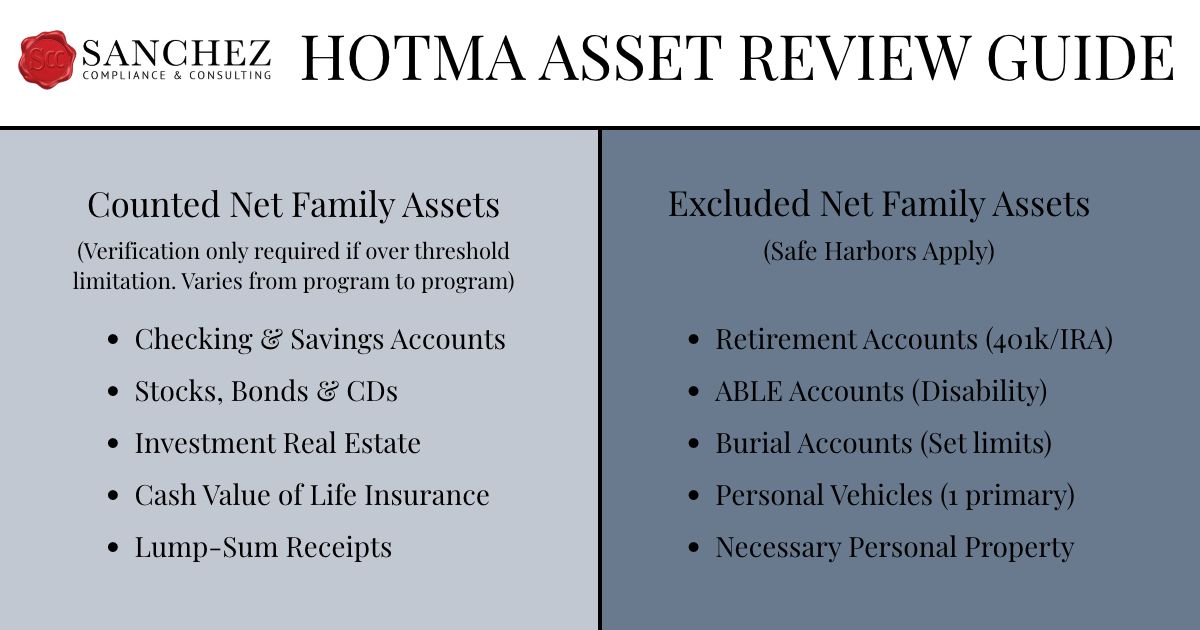
One of the biggest pain points is the net family assets limit. Staff also need to ask better questions about real property ownership, personal property, and family assets that may fall under income exclusions or excluded asset treatment.
The rule is not just about adding up accounts. It is also about knowing what should count, what should not, and when asset certification or self-certification is allowed.
This is where teams can waste time. Some overdo income verification on low-value excluded assets and miss bigger issues sitting right in front of them.
Interim reexamination triggers
Another big shift involves when an interim review is required and when it is optional. Staff need written steps for how residents report changes like child support, job loss, or new financial assistance and when the property acts.
If this is not clear, one staff member may process a change while another waits for annual income certification. That kind of uneven practice creates program compliance risk fast.
Passbook rate updates
Asset income calculations can also shift with the annual passbook savings rate. If your system uses an old setting, the file may calculate asset income wrong.
That sounds minor, but wrong math in ten files becomes a pattern. Patterns are what compliance monitoring staff, housing finance agencies, and auditors notice first.
HOTMA Compliance Checklist Texas Property Managers Can Use Now
This section is your working checklist. Print it, share it, and walk it with your onsite team before your next wave of recerts.
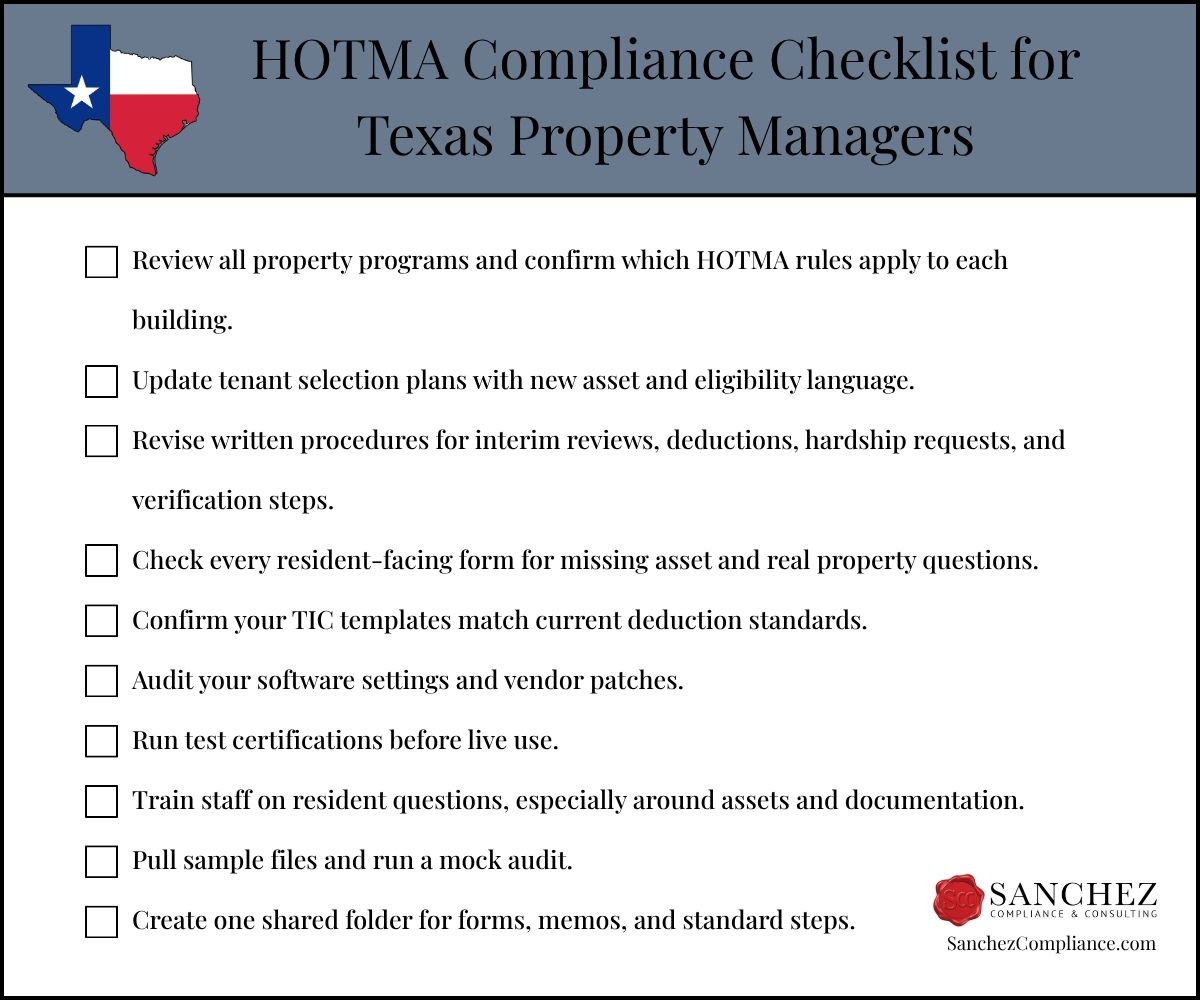
- Review all property programs and confirm which HOTMA rules apply to each building.
- Update tenant selection plans with new asset and eligibility language.
- Revise written procedures for interim reviews, deductions, hardship requests, and verification steps.
- Check every resident-facing form for missing asset and real property questions.
- Confirm your TIC templates match current deduction standards.
- Audit your software settings and vendor patches.
- Run test certifications before live use.
- Train staff on resident questions, especially around assets and documentation.
- Pull sample files and run a mock audit.
- Create one shared folder for forms, memos, and standard steps.
That list gives you the frame. Now let us break each item into the daily tasks that keep the whole thing moving.
Review Policies Before You Touch the Files
Most teams want to start with paperwork. But policy comes first because forms and staff steps should match the written rule.
If your written material is old, your team will fill in gaps with memory. That is where drift starts.
Update your tenant selection plan
Read your Tenant Selection Plan (TSP) to confirm it reflects current asset verification rules, real property ownership rules, and HOTMA eligibility criteria. Document the approval date for any policy adjustments. Keeping clear, timestamped records of policy changes protects your property during state or investor reviews.
Revise your procedures manual

Update site standard operating procedures (SOPs) to detail how staff handle interim reporting, child support income, pay stub verification, asset exclusions, and hardship requests. Written guidelines should eliminate single-person dependencies and keep income determinations uniform across site staff.
Match Texas overlays to your federal changes
Texas teams often need to reconcile state rules with federal changes. That means checking your site type, funding layers, and the current state forms in use.
If you hit a question about housing tax credits, community affairs guidance, or a Texas department requirement, the state lists office contacts through TDHCA offices. That can save your team from guessing.
Some sites may also deal with single family programs, emergency solutions grants, or homeless programs run through separate channels. If your property features layered funding (such as USDA Rural Development or HUD assistance alongside your tax credits), keep notes on which final rule applies to each funding source and where HUD published its latest issue guidance.
Audit Your Forms and Resident Documents
Forms tell staff what to ask. If your forms are outdated, your files will also be outdated.
This is usually the fastest place to find gaps. It is also one of the easiest areas to fix.
Check applications and questionnaires
Start with the application packet. Add or update questions on bank accounts, trust interests, cash value items, real property ownership, and any personal property items that matter to family assets review.
Make the wording direct. Residents answer better when the form sounds human and plain.
If your application does not ask enough detail, staff will spend more time chasing income verification later. That delay can hold up income certification, tenant income certification, and move-in timing.
Update certification tools and worksheets
Your certification packet should match current income and deduction treatment. If one worksheet is outdated, your whole packet can steer staff the wrong way.
Review your certification form, file certification checklist, compliant TIC format, and tenant income worksheet at the same time. This helps your certifications effective dates line up with the file facts.
Many management teams ask for a second set of eyes here. This page on LIHTC compliance file review gets into why that matters.
Build hardship request forms now
Do not wait until a resident asks. Build your hardship forms now for medical and child care issues that need written support.
Standard forms help staff gather the same facts each time. They also create a better paper trail for compliance monitoring.
Your hardship form should note what was requested, what was provided, and how the site made the decision. That level of backup supports asset management review and helps defend your income determination later.
Check Your Software Before It Creates Bad Math
Check your property management software settings before they throw off your mathematical calculations. Having updated forms is useless if your system continues to calculate certifications using legacy logic or outdated algorithms.
Confirm patches, TRACS 203A specs, and compliance settings
Reach out directly to your software vendor and company database administrator. Confirm that the latest HOTMA updates and TRACS version 203A specifications have been deployed and enabled across all property databases. Software vendor delays surrounding TRACS 203A readiness remain a top compliance hurdle, so verify how your system processes HUD housing assistance vouchers, tenant income certifications (TICs), asset passbook rules, and interim triggers. Get target release timelines in writing if your vendor is still running patch updates.
Run test files
Create sample households that hit common scenarios. Use one with medical expenses, one with child care costs, one with multiple assets, and one with real property ownership.
Add one file with child support income, one with changing wages backed by pay stubs, and one with excluded income sources. That gives your team a stronger picture of how the software treats real cases.
Then compare the output to your written expectations. If numbers do not line up, stop there and fix the setup.
Watch imports, carryovers, and legacy defaults
Older resident records can drag old data rules into a new cert. Imported templates can also carry settings no one notices at first.
That is why a small batch test helps. It catches silent errors before they multiply across the property.
It is also smart to run a discrepancy report if your platform allows it. That can flag unusual deductions, asset amounts, or income certification results before files move too far down the process.
Train Staff So They Can Explain the Changes

A policy can be perfect and still fail if the team cannot explain it. Residents will ask about assets, bank statements, property ownership, and why new forms look different.
If staff fumble those answers, move-ins and recerts slow down. Frustration spreads fast at the front desk.
Focus on the questions staff actually gets
Keep training practical. Use role play and sample resident questions instead of long slide decks.
- Why are you asking about property I do not live in?
- Do I have to report small savings accounts?
- Why did my deduction amount change?
- What happens if my income changes midyear?
- What paperwork do you need from me now?
- Will my rental assistance be affected?
- How do you review my pay stubs and other income verification records?
That is the real stuff your team hears. Train on that, and confidence goes up fast.
Create one source of truth
Build a shared folder or binder with current forms, memos, scripts, process maps, and frequently asked questions. If the team hunts across emails for answers, mistakes creep in.
Keep the folder dated. Replace old forms instead of stacking five versions in one place.
Your binder should include HUD notice updates, HOTMA impacts summaries, software guidance, and site-specific HOTMA policies. If you have regionals covering many multifamily properties, this step cuts a lot of repeat questions.
If your site needs broader context, this article on HOTMA & LIHTC compliance is a good internal training read.
Run an Internal Audit Before the Real One Finds the Gaps
Internal audits work because they create pressure without the real penalty. You get to see how your process performs before someone else scores it.
Pull a sample set of upcoming annuals, recent move-ins, and any files with layered funding. Then review them with one checklist across all reviewers.
What to review in each file
| File Area | What to Check | Why It Matters |
|---|---|---|
| Application packet | Current asset and property questions. | Old questions miss key facts. |
| Income docs | Complete support, pay stubs, and correct effective dates. | Wrong timing breaks calculations. |
| Deductions | Correct treatment and backup, if applicable | Impacts adjusted income and rent. |
| Assets | Counted versus excluded items and net family assets review. | Stops over-verification and missed limits. |
| Interim activity | Proper trigger and documented action, if applicable. | Shows consistent practice. |
| Software output | Math matches policy and file facts. | Confirms system settings are right. |
| Signatures and dates | All parties signed timely. | Keeps the file defensible. |
| Certification forms | Tenant income certification and certification form accuracy. | Supports clean audit results. |
Look for patterns, not just isolated misses. If three staff members skip the same item, the problem is process, not people.
For many teams, that is the point where outside review saves serious time. You can learn more through compliance evaluation services.
Common Texas HOTMA Problems That Cause Rework
Most file issues do not come from bad intent. They come from rushed rollouts, mixed messages, or forms that never got cleaned up.
Here are the trouble spots I would watch first.
Problem one: mixing old and new forms
This happens all the time. One site packet is current, another is stored on a shared drive from last year, and someone prints the wrong set.
Fix this by using one locked form library. Archive the old forms somewhere staff cannot grab them by mistake.
Problem two: unclear asset questions
If your form asks vague questions, residents give vague answers. That leads to callbacks, missing papers, and uneven treatment between households.
Plain language works better. Ask direct questions about accounts, ownership interests, family assets, and real property.
Problem three: documenting hardship poorly
A verbal note is not enough. If a hardship affects the file outcome, your backup should show what was requested, what was received, and how the decision was made.
This is one of those areas that feels small until someone reviews it later. Then it becomes the whole story.
Problem four: trusting software without testing it
Software is helpful, but it is not magic. One bad setting can keep spitting out wrong numbers across dozens of files.
Trust it after testing it. Not before.
Problem five: treating every asset like it needs full verification
Over-verifying slows your team and annoys residents. It also distracts staff from larger asset issues that need real attention.
Focus on material facts and current rules. The goal is accurate files, not bulky files.
Problem six: weak documentation of income changes
Some teams collect income verification but do not tie it back to the effective date used in the file. That causes confusion during reviews and can lead to a failed clarification record.
Each file should show what changed, when it changed, what documents supported it, and how the site handled the update. That level of detail matters in low-income housing tax and housing tax credit reviews.
A Simple 30 Day Action Plan for Property Teams
If you need a clean way to move, use this 30-day plan. It works well for site teams, regionals, and compliance leads.
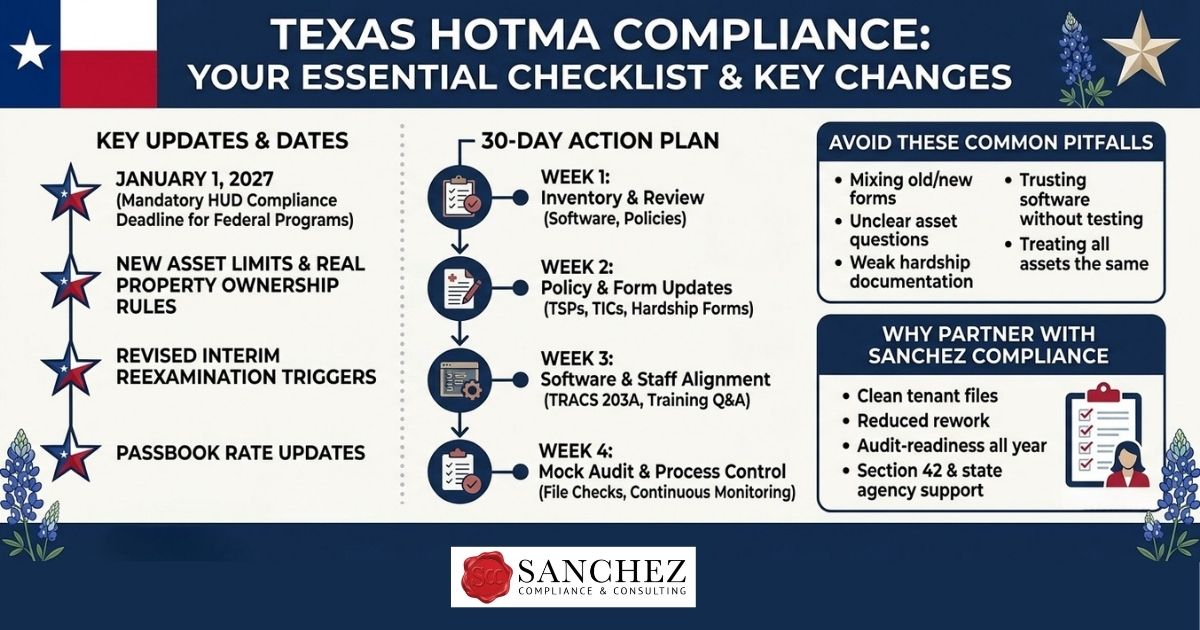
Week 1
- Audit property programs, gather current written policies, and review software version builds.
Week 2
- Update Tenant Selection Plans, resident application forms, TIC templates, and hardship worksheets.
Week 3
- Verify TRACS 203A system patches with software vendors. Run sample test certifications and host practical Q&A training for front-desk teams.
Week 4
- Review sample tenant files using a unified checklist. Correct recurring documentation gaps and establish ongoing monthly file checks.
This kind of rollout keeps the work moving. It also gives your team small wins fast, which matters more than people admit.
Why Texas Teams Bring in Outside File Review Help
Sometimes your staff knows the rules but does not have enough hours. Sometimes they are so close to the work that blind spots form.
That is normal. Fresh eyes catch what internal teams can miss after months of repetition.
Jeanie Sanchez and Sanchez Compliance & Consulting work with owners, developers, management companies, syndicators, investors, compliance leaders, regionals, and onsite teams. The focus is clear tenant file review systems, better backup, less repeat work, and stronger staff understanding.
That includes Section 42 and state agency support, utility allowance review work, pre-audit prep, post-audit response, remote file reviews, takeover due diligence audits, and limited onsite catch-up help. It is a practical model built around being audit ready all year.
For properties handling low-income housing tax credit, housing tax credits, or layered rental assistance, outside help can also support staff training and file consistency. It is especially helpful when you are implementing HOTMA across many buildings at once.
If your team needs broader operating guidance too, this article on LIHTC tips for managers is a solid next read.
Conclusion
A strong HOTMA compliance checklist Texas teams can follow should cover policy, forms, software, staff training, and internal audits. If you handle those five areas early, your files get cleaner, your staff gets calmer, and your review risk drops.
Texas compliance work often sits at the intersection of federal rule changes, state forms, housing opportunity goals, and day-to-day resident communication. That is why a checklist works so well: it turns HOTMA compliance into repeatable steps your team can actually follow.
If your property needs extra support, Sanchez Compliance & Consulting can help you sort the details, review files, and tighten your process before issues pile up. Put it all together, and the result is simple: better income verification, stronger tenant income certification files, smoother recerts, and a property that is ready for the next review.